
Signup and Add Money
Trump Accounts are now open. Parents, guardians and other authorized individuals can establish an account for an eligible child, activate it, receive available contributions and begin adding money.
If you first want to understand what a Trump Account is and how it works, see our earlier Tax Project Institute explainer:
Invest America Program: What You Should Know [1]
This guide focuses on the next step: how to open an account, activate it and add money.
Who Can Get a Trump Account?
Requirements to open a Trump Account for your child :
- The child has a valid Social Security number issued before the election is made.
- The child is under age 18 at the end of the year in which the election is made.
- A Trump Account election has not already been filed for the child. [2][3]
For an account opened in 2026, that means the child generally must have been born after December 31, 2008.
U.S. citizenship is not required to open a Trump Account. However, citizenship is required for the one-time $1,000 federal contribution available to qualifying children born between 2025 through 2028. [3][5]
How to Sign Up
There are two online ways to start. Both use the same IRS Form 4547 and ultimately submit the election to the IRS. [2][4]
Option 1: Start With the Trump Accounts App or Website
Start at the official government website:
On a phone, select Download the app and follow the prompts.
On a desktop computer, you can go directly to:
Select Get started, enter the requested information and complete IRS Form 4547.
The Trump Accounts system will guide you through identity verification and securely submit the completed form to the IRS. [4]
Option 2: Start Directly With the IRS
Go to:
https://www.irs.gov/trumpaccounts
Select Sign in or create account, sign in through ID.me and complete Form 4547.
You will need:
- Your ID.me account
- Your child’s Social Security number
- Your child’s date of birth
- Your child’s address
The IRS says its online election process generally takes about 5 to 10 minutes. That is the time to complete and submit the election, not the total time until the investment account is activated. [2]
Already Filed Form 4547 With Your 2025 Tax Return?
If you already filed Form 4547 with your 2025 federal tax return, you generally do not need to submit it again.
Wait until you receive notification that the child’s account is ready to activate. [4][5]
Signup Process at a Glance
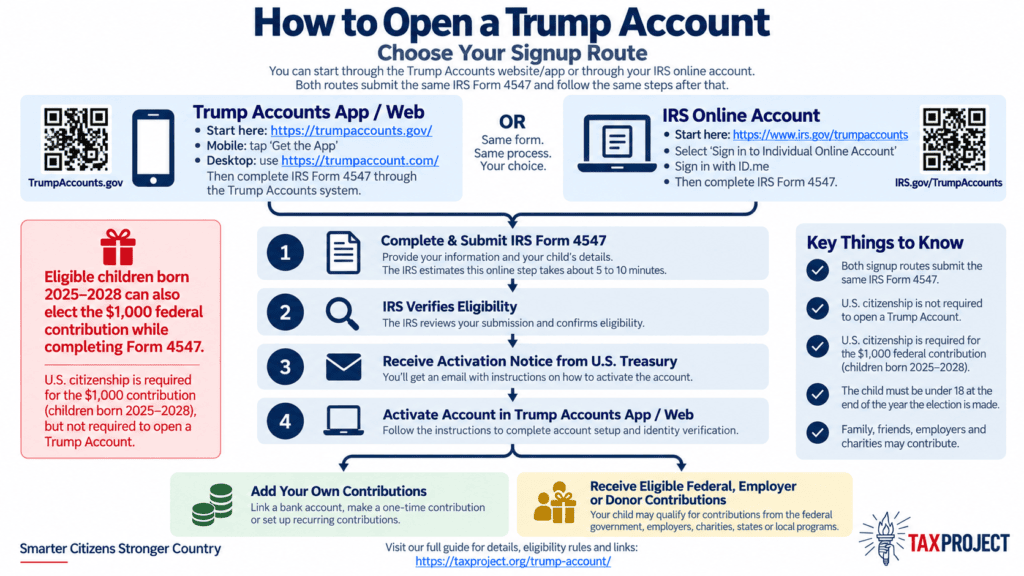
What Happens After You Apply?
After the IRS processes Form 4547 and confirms eligibility, you will receive instructions to activate the account.
Official activation emails may come from: no-reply@trumpaccounts.treasury.gov
If you used the Trump Accounts app, you may also receive an in-app notification. [4][5]
To activate the account, return to the Trump Accounts app or:
Follow the prompts to verify your information and finish setting up the child’s account.
$1,000 Federal Contribution?
Does your child qualify for the $1000 federal seed contribution?
Requirements to qualify, the child must generally:
- Be a U.S. citizen.
- Have a valid Social Security number.
- Have been born January 1, 2025 through December 31, 2028.
- Meet the applicable IRS qualifying-child requirements.
- Not already have had a $1,000 pilot contribution election processed. [3]
If the child qualifies, elect the $1,000 contribution when completing Form 4547.
A child who does not qualify for the $1,000 can still open and have a Trump Account.
How to Add Money
Once the account is activated, you can link a bank account or eligible debit card and make contributions through the Trump Accounts app or website. [6][7]
For 2026, regular contributions are generally limited to a combined $5,000 per child per year. Contributions from parents, relatives, friends and employers count toward that limit. [6]
Certain qualifying government and donor contributions, along with the one-time $1,000 federal contribution, do not count toward the regular $5,000 limit. [6][9]
Bank deposits can take up to five business days. Eligible debit-card transfers are generally much faster. [7]
Family members and friends may also contribute to a child’s Trump Account without being given control of the account. [6]
Available Contributions and Tax Benefits
It is important to distinguish these benefits from income-tax credits. The programs below generally involve money contributed to the child’s account or favorable tax treatment, not a credit claimed on your tax return.
$1,000 Federal Contribution
Qualifying U.S. citizen children born from January 1, 2025 through December 31, 2028 can receive a one-time $1,000 U.S. Treasury contribution. [2][3]
More information:
https://www.irs.gov/trumpaccounts
$250 Dell Contribution
Michael and Susan Dell have funded a $250 contribution for qualifying children who generally fall outside the age range for the federal $1,000 contribution.
To qualify under the current program, the child generally must:
- Have been born from 2016 through 2024.
- Have a valid Social Security number.
- Live in a ZIP code with median family income of $150,000 or less, based on the program’s Census criteria.
The program is limited to the first 25 million qualifying activated accounts. [10]
Check eligibility: https://investamerica.org/dell/
Employer Contributions
Employers may establish programs to contribute to Trump Accounts for employees’ dependents.
Current Treasury guidance allows qualifying employer contributions of up to $2,500 per employee per year across the employee’s dependent Trump Accounts. These contributions generally count toward the child’s regular $5,000 annual contribution limit. [6][11]
Whether this benefit is available depends on your employer.
Other Donor, State and Local Contributions
Philanthropists, foundations, companies, states and local governments can also establish programs for groups of eligible children.
Each program can set its own eligibility requirements, such as age or where a child lives. Qualified donor contributions facilitated through Treasury generally do not count against the normal $5,000 annual contribution limit. [9]
More information: https://trumpaccount.com/us/en/support/articles/donor-gifts/
Tax-Deferred Investment Growth
Personal contributions to a Trump Account are not federally tax-deductible. However, investment earnings are generally tax-deferred, meaning the child does not pay tax each year on investment gains while those earnings remain in the account. [8]
So it helps to separate three things:
- Personal contributions: Money contributed by parents, relatives, friends or the child.
- Outside contributions: Money provided by government, employers, philanthropists or other qualifying programs.
- Tax benefits: The tax treatment of money and investment earnings inside the account.
The $1,000 federal contribution and $250 Dell contribution are not income-tax credits claimed on your tax return.
The Simple Version
For most families, the process is:
- Check eligibility. The child needs a valid Social Security number and must be under age 18 at the end of the year in which you apply.
- Choose where to start: Trump Accounts or the IRS.
- Complete Form 4547.
- Request the $1,000 federal contribution if the child qualifies.
- Wait for the activation notice.
- Activate the Trump Account.
- Link a bank account or eligible debit card and contribute.
- Check for employer, charitable, state, local or other contributions.
Quick Links
Tax Project Institute: What Is a Trump Account?
https://taxproject.org/trump-account/
Official Trump Accounts Government Website
https://trumpaccounts.gov/
Trump Accounts App / Web Portal
https://trumpaccount.com/
IRS Trump Accounts Page and Signup
https://www.irs.gov/trumpaccounts
Trump Accounts Help Center
https://trumpaccount.com/us/en/support/
References
[1] Tax Project Institute. (2025, December 3). Invest America program: What you should know. https://taxproject.org/trump-account/
[2] Internal Revenue Service. (n.d.). Trump Accounts. Retrieved September 23, 2026, https://www.irs.gov/trumpaccounts
[3] Internal Revenue Service. (2025, December). Instructions for Form 4547: Trump Account election(s). https://www.irs.gov/instructions/i4547
[4] Trump Accounts. (n.d.). How to complete Form 4547. Retrieved September 23, 2026, https://trumpaccount.com/us/en/support/articles/form-4547/
[5] Trump Accounts. (n.d.). Activate an account. Retrieved September 23, 2026, https://trumpaccount.com/us/en/support/articles/activate-account/
[6] Trump Accounts. (n.d.). Contributions FAQ. Retrieved September 23, 2026, https://trumpaccount.com/us/en/support/articles/contributions-faq/
[7] Trump Accounts. (n.d.). Link accounts. Retrieved September 23, 2026, https://trumpaccount.com/us/en/support/articles/link-accounts/
[8] Trump Accounts. (n.d.). Tax documents FAQ. Retrieved September 23, 2026, https://trumpaccount.com/us/en/support/articles/tax-documents-faq/
[9] Trump Accounts. (n.d.). Donor gifts. Retrieved September 23, 2026, https://trumpaccount.com/us/en/support/articles/donor-gifts/
[10] Invest America. (n.d.). Does your child qualify for $250? Retrieved September 23, 2026, https://investamerica.org/dell/
[11] U.S. Department of the Treasury. (2026, August 11). Treasury announces employer contributions to Trump Accounts, drawing corporate support.
https://home.treasury.gov/news/press-releases/sb0602
[12] U.S. Department of the Treasury. (n.d.). Trump Accounts. Retrieved September 23, 2026, https://trumpaccounts.gov/